Getting Started with cURL
Before cURL: What is a server and why do we talk to it?
Whenever we open a website, submit a form, or log in to an app, we are actually talking to a server.
A server is just another computer on the internet whose job is to:
receive requests
process them
send back responses
For example:
Asking for a webpage
Sending login details
Fetching data from an API
Normally, the browser does this communication for us.
But as developers, we often want to talk to servers directly.
That’s where cURL comes in.
What is cURL? (In very simple terms)
cURL is a tool that lets us send requests to a server from the terminal.
Think of it like:
Browser → sends requests visually
cURL → sends requests using commands
With cURL, we can:
request a webpage
send data to a server
talk to APIs
test backend endpoints
All without opening a browser.
Why do programmers need cURL?
As developers, cURL helps us to:
Test APIs quickly
Check if a server is working
Debug backend endpoints
Understand how requests and responses actually work
Work without frontend code
It gives us direct control and helps us understand what’s happening behind the scenes.
Making your first request using cURL
Let’s start with the simplest possible command.
Open your terminal and type:
curl https://example.com
That’s it.
What just happened?
cURL sent a request to the server
The server responded with data
cURL printed that response in the terminal
This is similar to opening a website in a browser — just without the UI.
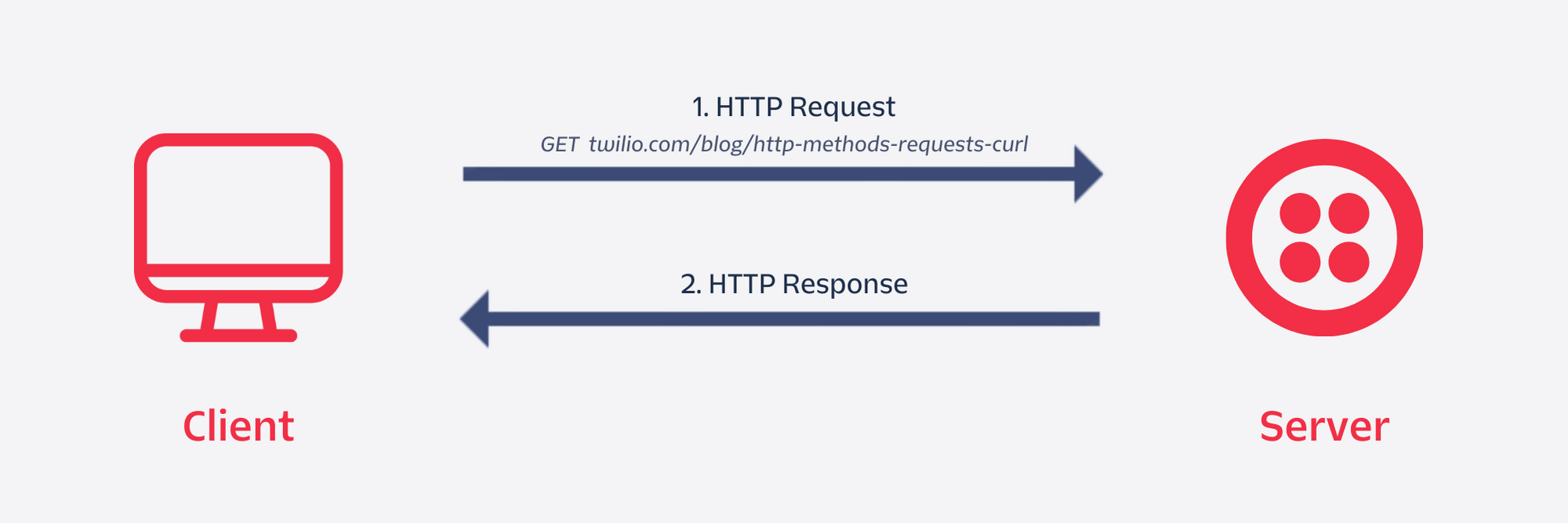
Understanding request and response
Every communication with a server has two parts:
1️⃣ Request
Sent by the client (browser or cURL)
- “Hey server, I want this data”
2️⃣ Response
Sent by the server
Status (success or error)
Data (HTML, JSON, text, etc.)
When we use cURL:
We send the request
We see the response directly
This is why cURL is great for learning backend concepts.
Using cURL to talk to APIs
Most APIs work using HTTP requests.
GET request (fetching data)
curl https://api.example.com/users
This means:
“Server, please give me the users data.”
The server replies with:
status code
response data (often JSON)
POST request (sending data)
POST is used when we want to send data to the server.
Conceptually, it means:
“Server, here is some data. Please process it.”
We’ll keep it simple for now — the idea matters more than syntax at this stage.
As beginners, understanding when to use GET and POST is more important than memorizing flags.
Browser request vs cURL request
Both browser and cURL do the same thing:
Send HTTP requests
Receive HTTP responses
The difference is:
Browser → automatic, visual
cURL → manual, text-based
cURL helps us see and control what’s actually happening.

5
Where cURL fits in backend development
cURL is commonly used:
While building APIs
While testing backend routes
While debugging server issues
Before frontend integration
It’s often the first tool backend developers reach for.
Common mistakes beginners make with cURL
Here are a few gentle warnings:
Trying to learn all flags at once
Copy-pasting complex commands without understanding
Confusing GET and POST
Expecting browser-like output (HTML rendering)
Thinking cURL is only for advanced users
👉 cURL is simple first, powerful later.
Final thoughts
cURL is not scary or complicated.
At its core, it’s just:
A way to send messages to a server from the terminal
If we understand cURL:
APIs make more sense
Backend development feels clearer
Debugging becomes easier
Once we’re comfortable with the basics, adding more options and depth becomes much easier.
And that’s why cURL is an essential tool for every web developer 🚀