How DNS Resolution Works (Step by Step)
DNS: The internet’s phonebook (quick recap)
When we type a website like:
google.com
into a browser, the browser doesn’t know where that site is hosted.
Computers don’t understand names — they understand IP addresses.
So DNS exists to answer one basic question:
👉 “What IP address belongs to this domain name?”
DNS works like the phonebook of the internet:
Domain name → IP address
Human-friendly → machine-friendly
But how does DNS actually find that answer?
That’s what DNS resolution is about.
What is DNS resolution?
DNS resolution is the step-by-step process of finding the IP address for a domain name.
It doesn’t happen in one jump.
It happens in layers:
Root servers
   ↓
TLD servers (.com, .org, .in)
   ↓
Authoritative name servers
   ↓
Final IP address
To understand this clearly, we’ll use a tool called dig.
What is the dig command?
dig stands for Domain Information Groper.
It is a command-line tool used to:
inspect DNS records
debug DNS issues
understand how DNS resolution works internally
Browsers do DNS lookups automatically.dig lets us see each step manually.
Think of dig as:
“Show me how DNS finds the answer.”
Understanding dig . NS — Root name servers
Let’s start from the top of the DNS hierarchy.
dig . NS
What does this mean?
.represents the DNS rootNSasks: Which name servers are responsible here?
What we learn
This command returns the root name servers.
Root servers don’t know IP addresses for websites.
They only know:
“Who handles
.com,.org,.net, etc.”
They are the starting point of every DNS lookup.
Understanding dig com NS — TLD name servers
Now let’s ask about the .com domain.
dig com NS
What does this mean?
- We are asking: Who manages all
.comdomains?
What we learn
This returns TLD (Top-Level Domain) name servers for .com.
These servers don’t know Google’s IP yet.
They only know:
“Which name servers are responsible for each
.comdomain?”
So they will point us to the authoritative name servers.
Understanding dig google.com NS — Authoritative name servers
Next step:
dig google.com NS
What does this mean?
- We are asking: Which servers are authoritative for google.com?
What we learn
This returns Google’s authoritative name servers.
These servers:
hold the real DNS records
know the actual IP addresses
are the final authority for the domain
At this point, DNS knows where to ask for the final answer.
Understanding dig google.com — Full DNS resolution
Now the final step:
dig google.com
What happens here?
dig follows the DNS chain
queries the authoritative name servers
retrieves the A / AAAA records
Result
We finally get:
IP address(es) for
google.comTTL (cache time)
record type (A or AAAA)
This is the same information a browser uses to connect to Google’s servers.
DNS resolution flow (putting it all together)
When a browser tries to open google.com, the flow looks like this:
Ask a recursive resolver (ISP / local DNS)
Resolver asks root servers
Root points to .com TLD servers
TLD points to Google’s authoritative servers
Authoritative server returns IP address
Browser connects to the server
The browser never talks directly to all these servers.
The recursive resolver does this work behind the scenes.
Why NS records matter in DNS resolution
NS (Name Server) records define:
who is responsible for a domain
where DNS queries should be sent next
Without NS records:
DNS resolution cannot move forward
the chain breaks
Every layer in DNS resolution depends on NS records to continue.
How this connects to real browser requests
When we open a website:
DNS resolution happens first
IP address is resolved
HTTP request is sent next
If DNS fails:
the browser never reaches the server
we see errors like “DNS_PROBE_FINISHED_NXDOMAIN”
Understanding DNS resolution helps us debug:
website not loading
incorrect hosting
email delivery issues
Visual mental model
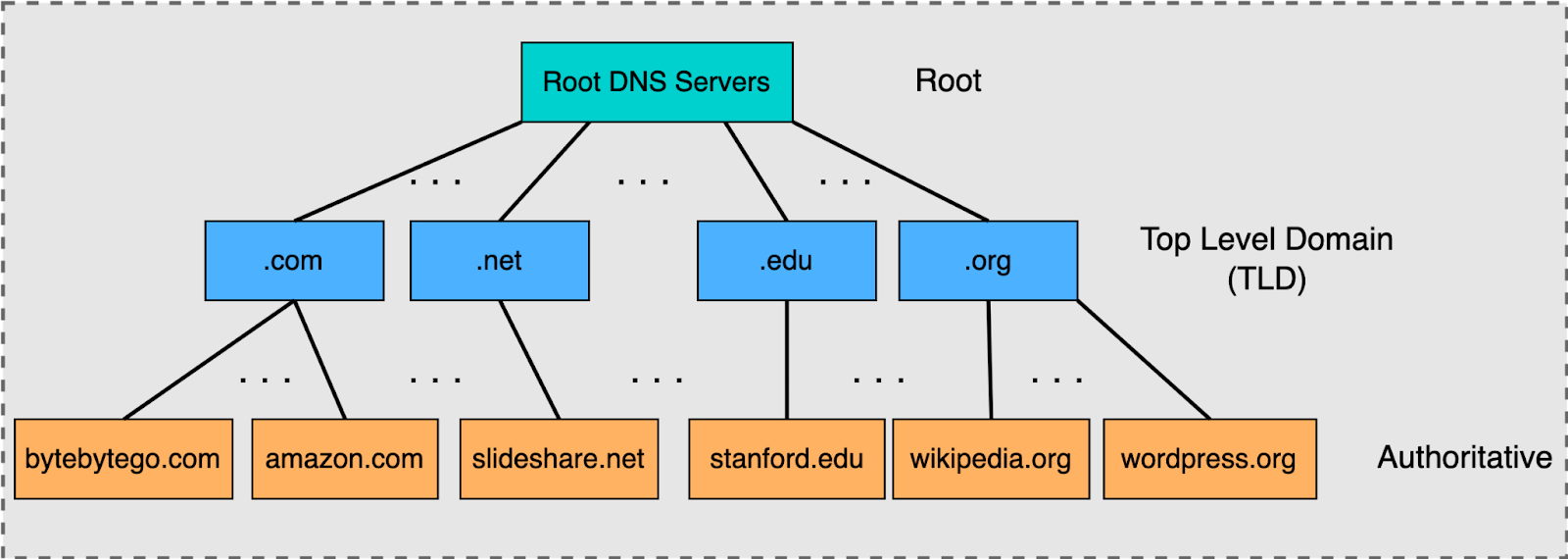
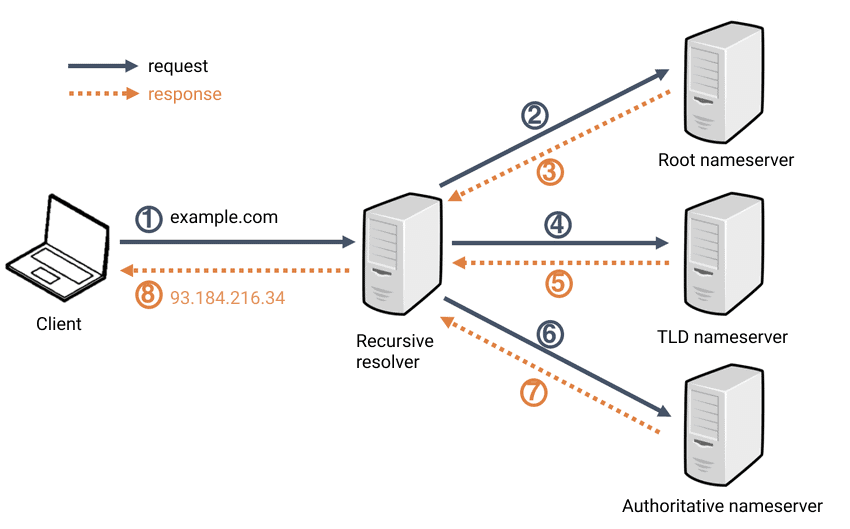

4
Final thoughts
DNS resolution may look complex, but it’s actually very structured.
Key takeaways:
DNS works in layers
Each layer only knows one level down
diglets us inspect each stageBrowsers rely on recursive resolvers to do this work
Once we understand DNS resolution:
system design concepts feel clearer
backend debugging becomes easier
networking stops feeling mysterious
And that’s why DNS resolution is a core concept every web developer should understand 🚀